Motion Component (IMU)
The motion hub component allows you to define sensors that read data from inertial measurement units (IMUs)
such as accelerometers and gyroscopes. Not all IMU chips support all types of measurements, see the individual platform
documentation for details.
# Example configuration entrymotion:  - platform: ...    acceleration_range: 4G # Platform dependent options here
sensor:  - platform: motion    type: acceleration_x    name: "Accel X"  - platform: motion    type: angular_rate_x    name: "Gyro X"  - platform: motion    type: pitch    name: "Pitch Angle"
Configuration variables
Section titled “Configuration variables”Base configuration
Section titled “Base configuration”-
axis_map (Optional, mapping): Remap or invert the physical axes of the sensor to match your board orientation. Each key (
x,y,z) maps to the physical axis it should read from, optionally prefixed with-to invert. All three axes must be present and each physical axis may only appear once. Mutually exclusive withtransform_matrix.# Example: swap X and Y, invert Zmotion:- platform: ...axis_map:x: yy: xz: "-z" -
transform_matrix (Optional, list of floats): A 3×3 transformation matrix applied to raw accelerometer and gyroscope readings. This allows arbitrary calibration beyond simple axis remapping. Can be specified as a flat list of 9 values (row-major order) or as a 3×3 nested list. Mutually exclusive with
axis_map.# Example: 3x3 nested formatmotion:- platform: ...transform_matrix:- [0.998, 0.010, -0.050]- [-0.010, 0.999, 0.020]- [0.050, -0.020, 0.998]# Example: flat formatmotion:- platform: ...transform_matrix: [0.998, 0.010, -0.050, -0.010, 0.999, 0.020, 0.050, -0.020, 0.998]The matrix can be obtained from the runtime calibration actions described below — after calibration the computed matrix is logged in a format that can be copied directly into your configuration for persistent use.
-
update_interval (Optional, Time): The interval at which sensor data is read. Defaults to
250ms. -
id (Optional, ID): Manually specify the ID used for code generation.
Sensor configuration
Section titled “Sensor configuration”- type (Required, string): The type of measurement to expose. One of:
acceleration_x: X-axis acceleration ing.acceleration_y: Y-axis acceleration ing.acceleration_z: Z-axis acceleration ing.angular_rate_x: X-axis angular velocity in°/s.angular_rate_y: Y-axis angular velocity in°/s.angular_rate_z: Z-axis angular velocity in°/s.gyroscope_x: Synonym forangular_rate_x.gyroscope_y: Synonym forangular_rate_y.gyroscope_z: Synonym forangular_rate_z.pitch: Pitch angle in°.roll: Roll angle in°.
- All other options from Sensor.
Actions
Section titled “Actions”motion.calibrate_level Action
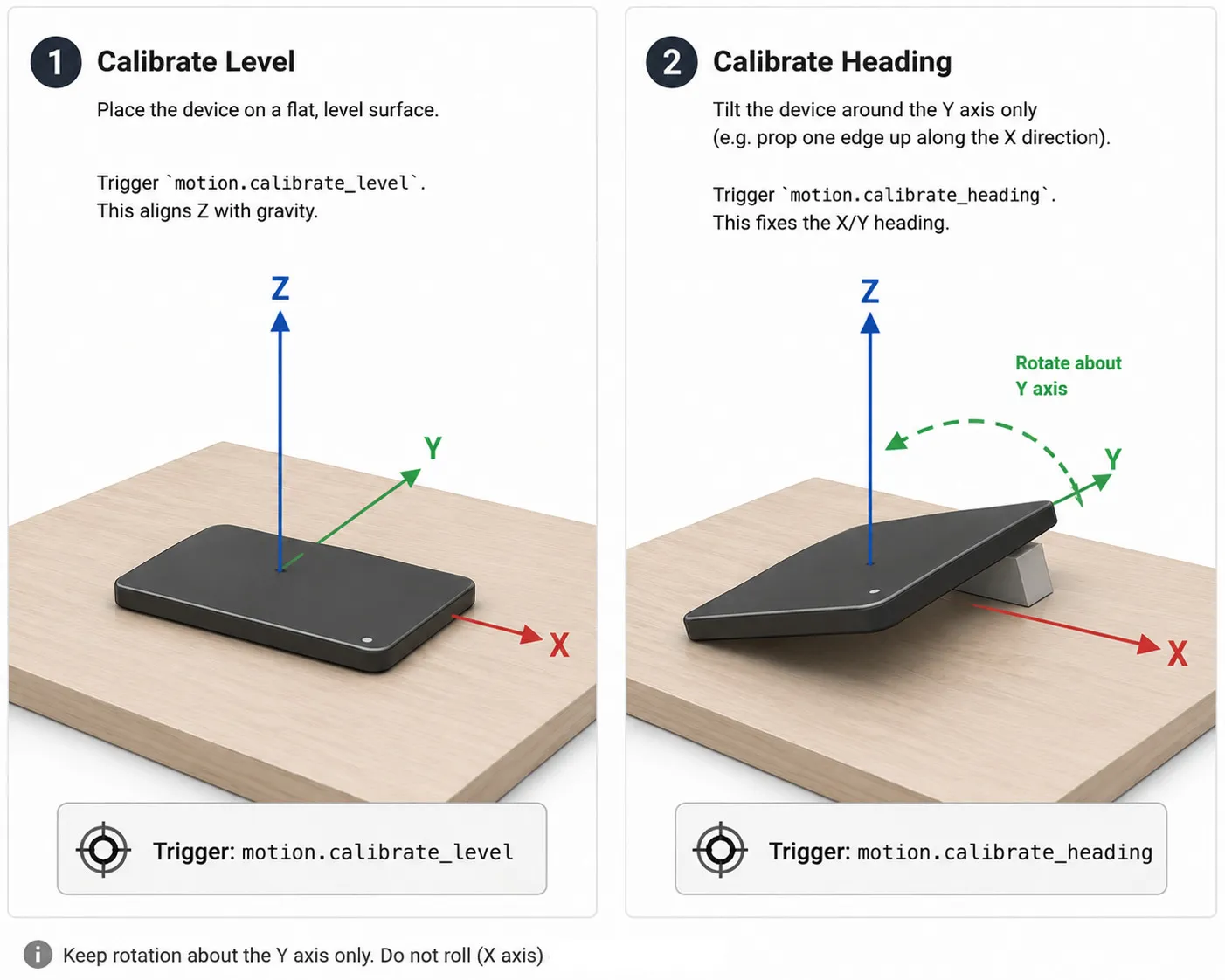
Section titled “motion.calibrate_level Action”This action computes a calibration matrix so that the
current accelerometer reading maps to [0, 0, 1] (device flat, Z pointing up). Place the
device on a level surface and trigger this action. It replaces the current transform_matrix.
- save (Optional, boolean): Save the resulting matrix to NVS flash so it is
automatically restored on the next boot. Defaults to
false. - on_success (Optional, Automation): Actions to run when calibration succeeds.
- on_error (Optional, Automation): Actions to run when calibration fails (e.g. sensor read failure or insufficient tilt).
on_...: then: - motion.calibrate_level: id: my_motion save: true on_success: - logger.log: "Level calibration succeeded" on_error: - logger.log: "Level calibration failed"After execution the resulting matrix is logged at INFO level in a format that can be
copied into the transform_matrix configuration for persistent calibration.
motion.calibrate_heading Action
Section titled “motion.calibrate_heading Action”This action corrects the heading (rotation around Z) after a prior level calibration. Tilt the device around its Y axis only (pitch forward or backward) and trigger this action. It composes a Z-rotation correction with the existing matrix so that the horizontal acceleration component falls entirely on the X axis, with its sign preserved.
- save (Optional, boolean): Save the resulting matrix to NVS flash. Defaults to
false. - on_success (Optional, Automation): Actions to run when calibration succeeds.
- on_error (Optional, Automation): Actions to run when calibration fails.
on_...: then: - motion.calibrate_heading: id: my_motion save: true on_success: - logger.log: "Heading calibration succeeded"motion.clear_calibration Action
Section titled “motion.clear_calibration Action”This action discards any runtime calibration and restores
the build-time matrix defined by axis_map or transform_matrix (or the identity matrix if
neither is configured). Use it to undo a motion.calibrate_level / motion.calibrate_heading
sequence without re-flashing.
- save (Optional, boolean): Also clear the saved calibration in NVS flash so the reset
persists across reboots. Defaults to
false. Whenfalse, the in-memory matrix is reset but a previously saved calibration will be restored again on the next boot.
on_...: then: - motion.clear_calibration: id: my_motion save: trueCalibration persistence
Section titled “Calibration persistence”When a calibration action is run with save: true, the resulting matrix is stored in NVS flash
and automatically restored on the next boot, taking precedence over the axis_map /
transform_matrix configuration. The saved calibration is tied to the configured base matrix:
if you change axis_map or transform_matrix and re-flash, the stale saved calibration is
automatically discarded and the new configuration is used. To explicitly return to the
configured base at runtime, use motion.clear_calibration.
Calibration procedure
Section titled “Calibration procedure”- Place the device on a flat, level surface.
- Trigger
motion.calibrate_level. This aligns Z with gravity. - Tilt the device around the Y axis only (e.g. prop one edge up along the X direction).
- Trigger
motion.calibrate_heading. This fixes the X/Y heading.
The new calibration matrix is now active and can be saved to flash if desired. If you have a way to monitor the logs, you can verify that the calibration succeeded by checking for an INFO log entry with the resulting matrix in a format suitable for copy-pasting into your configuration.